 Photo
PhotoHow to delete duplicate photos on Android
Short answer: duplicate photos on an Android phone live in two different places, and each needs its own fix. Duplicates in the phone's storage (chat re-saves, download copies) are cleaned with Files by Google. Duplicates in your Google Photos library — the ones you see in the Photos app — can't be auto-removed on the phone at all: the app has no duplicate finder. The fix there is a one-time cleanup of the cloud library from desktop Chrome, which then syncs to your phone and every other device.
The key thing to understand: the Google Photos app on your phone is a window into your cloud library. If duplicates show up there, they're in the cloud — deleting files from the phone's storage won't touch them, and cleaning the cloud fixes every synced device at once.
Where Android duplicates come from
- Messaging apps — WhatsApp and Telegram save incoming media to their own folders. If Google Photos backs those folders up, every photo a friend sends back to you lands in your library next to your original.
- Downloads — the same image saved twice from the browser or email gets a "(1)" filename and both copies stay.
- Edited copies and screenshots — an edit saved next to the original, or a screenshot of a photo you already have.
- Two devices backing up the same shot — often at different compression levels, so Google treats them as different files.
Step 1: Clean duplicates in the phone's storage (Files by Google)
- Open Files by Google (pre-installed on most Android phones).
- Go to the Clean tab.
- If duplicate files are found, a duplicate-files suggestion appears — review and delete the copies. Google documents this in its free-up-space guide.
This frees phone storage, but it only sees files on the device. Anything already backed up to Google Photos stays duplicated in the cloud — and keeps counting against your Google One storage.
Step 2: Delete duplicates in the Google Photos app (manual only)
- Open the Google Photos app and scroll chronologically — duplicates usually sit together because they share a capture date.
- Long-press one photo to start selecting, tap the extra copies, then tap the trash icon.
- Deleted photos stay in trash for 60 days, so mistakes are recoverable.
Honest assessment: fine for a handful of known duplicates, hopeless for years of accumulation. The app has no duplicate finder, no side-by-side comparison, and re-compressed copies rarely sit next to each other.
Step 3: Clean the whole library once, from a computer
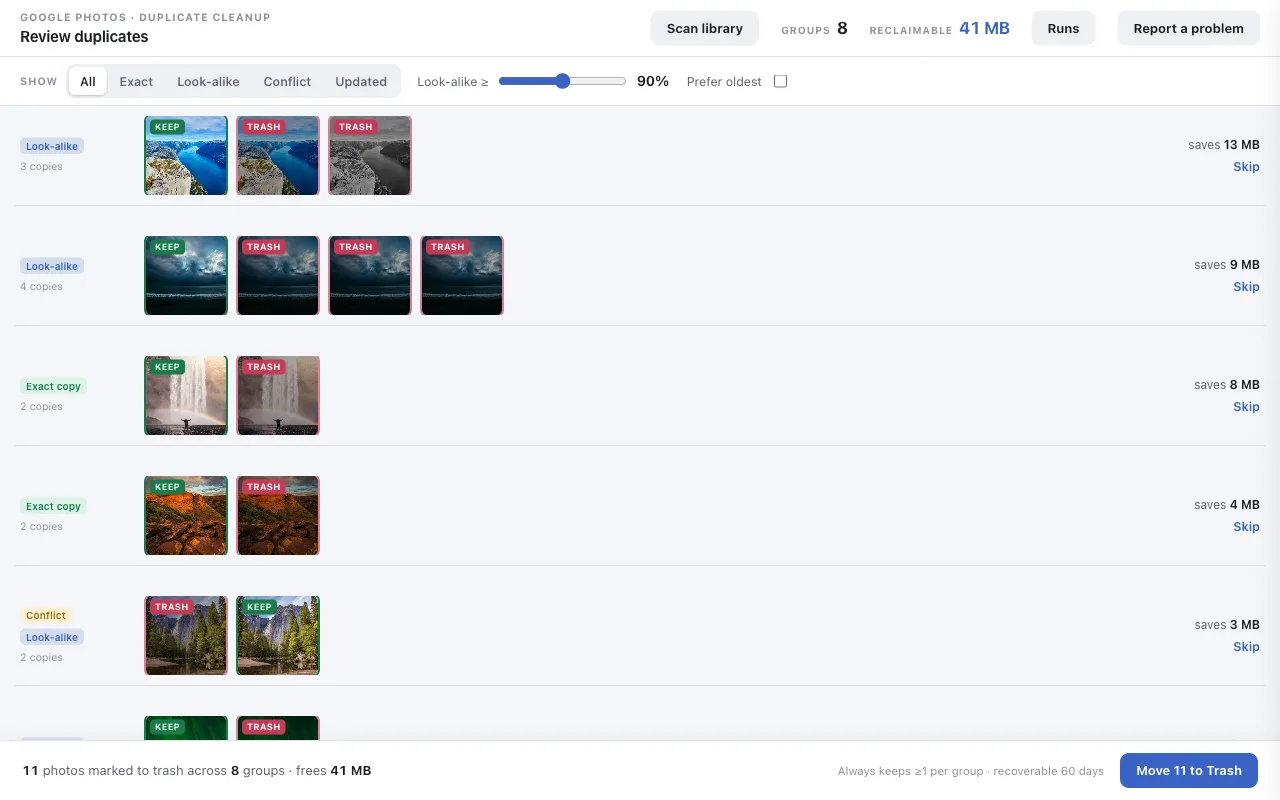
For a library-wide cleanup, borrow any computer with Chrome for fifteen minutes. Since Google removed third-party API access to Google Photos in March 2025, a browser extension working inside your own photos.google.com session is the only automated way in — and because it cleans the cloud library itself, your phone reflects the result as soon as it syncs.
The short version: install PhotoDeduper from the Chrome Web Store (free, no sign-up), let it scan your library at photos.google.com, and approve the cleanup it proposes — the rejected copies land in the recoverable Google Photos trash. Then pick up your phone: they're gone there too. The full walkthrough, including the manual and Takeout alternatives, lives in the main guide: How to delete duplicate photos in Google Photos →
Stop duplicates coming back
The biggest repeat offender is folder backup. In the Google Photos app, open your profile → Photos settings → Backup → Back up device folders, and turn off backup for folders like WhatsApp Images. Chat re-saves then stay on the phone (where Files by Google can catch them) instead of re-entering your cloud library.
Which fix do you actually need?
- Phone storage full → Files by Google, plus Google Photos' own free-up-space tool once photos are backed up.
- Duplicates visible in the Photos app → they're in the cloud; one desktop run with an extension clears them everywhere.
- Both → do the desktop cleanup first, then the phone cleanup — the cloud copy is the one that costs you storage quota.
Clean your library once — every device follows
On-device scanning · trash-only deletes · recoverable for 60 days
Add PhotoDeduper to ChromeFree during launch. No account, no sign-up.
Frequently asked
Can the Google Photos app on Android remove duplicates?
No — the app has no duplicate finder; you can only delete copies by hand. A library-wide cleanup needs desktop Chrome, but since the app shows your cloud library, the result appears on your phone as soon as it syncs.
Does Files by Google clean my Google Photos library?
No. Its duplicate-file suggestion only deletes files stored on the phone itself. Cloud duplicates in Google Photos stay — cleaning one doesn't touch the other.
Do I need a computer?
For a library-wide cleanup, yes — once. Google removed third-party API access in March 2025, so the browser session is the only way an automated tool can see your library. Any computer with Chrome works; the cleanup lives in the cloud, not on that machine.
Why do deleted duplicates keep coming back?
Usually folder backup re-uploading messenger re-saves. Turn off backup for chat folders in Google Photos' backup settings and new copies stop entering your library.